How to Rename a Grid Column Coming from a Selector
In Acumatica customizations, it’s quite common to adjust grid column headers so they better match business terminology or improve screen readability.
In most cases, renaming a column is straightforward and can be done using standard DAC-based approaches. However, there are situations where the column does not map to a physical DAC field — especially when the column is generated by a selector.
This article focuses specifically on that scenario and shows a practical way to rename such a column.
The Typical Problem
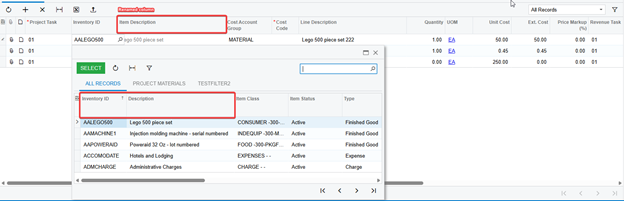
Consider a grid that contains the InventoryID field.
Along with the main value, Acumatica automatically adds a separate column that displays the Description coming from the selector. Internally, this column usually has a DataField similar to:
InventoryID_description
Key characteristics of this column:
- It is generated dynamically by the selector
- It does not exist as a physical DAC field
- It cannot be referenced using PXUIField, SetDisplayName, or CacheAttached
All of these approaches require a real DAC field. Since selector description columns are created at runtime, they fall outside of these mechanisms.
When DAC-based options are not available, you can work directly with the grid at the UI level.
The general approach is simple:
· Access the current page instance
· Find the required PXGrid on the page
· Wait until the grid finishes synchronizing its state
· Update the column header text programmatically
This can be done by subscribing to the grid’s AfterSyncState event, which is triggered after the grid has fully initialized its columns.
Implementation Example
Below is a complete working example that demonstrates how to rename a selector-generated column header.
AfterSyncState is triggered after the grid has fully built and synchronized its columns
At this point, selector-generated columns already exist in grid.Columns
The column can be safely located by its DataField and its header updated
This approach has no dependency on DAC metadata and operates purely at the UI level.