Implementing Asynchronous Operations in Acumatica 26R1
Purpose of the Sample
We created a small Acumatica customization that demonstrates the modern 26R1 way to start a long-running operation from a screen action. The goal: the operation is intentionally lightweight, but the structure follows the same framework rules you would use for real processing logic.
- Create a new screen is XX501000, named Async Operation Demo.
- The operation iterates through recent Sales Orders for a selected order type and writes progress to PXTrace.
Concepts:
The Acumatica guide explains that each UI request creates a graph instance for that request. Code that may take a long time should not run synchronously in that request because it can tie up the request lifecycle and prevent the UI from showing long-operation status.
- Inside a graph or graph extension, use the graph's LongOperationManager property. This exposes IGraphLongOperationManager.
- Outside a graph, use ILongOperationManager through dependency injection and provide an operation key.
- PXLongOperation.StartOperation is the legacy approach. It still exists, but the guide recommends the manager interfaces for modern code.
- An action that starts a long operation should return IEnumerable so Acumatica can display completion and errors in the UI.
- The background delegate should not use the current request graph state. Create a fresh graph instance inside the long operation.
- The cancellation token supplied by the framework should be checked periodically.
Step 1: Create the ASPX Screen
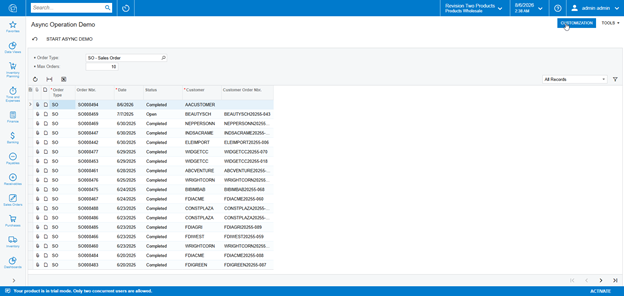
The form contains two fields: Order Type and Max Orders. The grid shows the records the background process will iterate over. The grid is read-only because the sample is about asynchronous processing, not editing sales orders.
Step 2: Create the Filter DAC
The filter is a non-persistent DAC using PXBqlTable and IBqlTable. It holds the user input needed by the action. The Order Type selector uses Fluent BQL, and Max Orders controls how much lightweight work the operation performs.
Step 3: Define the Graph Views
The graph has a filter view and a read-only Sales Order view. The Sales Order view uses Fluent BQL to filter by the current order type from the filter and sort recent orders first.
public PXFilter<SOAsyncOperationDemoFilter> Filter;
[PXFilterable]
public SelectFrom<SOOrder>
.Where<SOOrder.orderType.IsEqual<SOAsyncOperationDemoFilter.orderType.FromCurrent>>
.OrderBy<SOOrder.orderDate.Desc, SOOrder.orderNbr.Desc>
.View Orders;
Step 4: Add the Action Button
The StartAsyncDemo action is declared as a PXAction over the filter DAC. The handler returns IEnumerable, which is important for Acumatica long-operation UI handling. The action validates user input with pattern matching, copies simple values into an immutable request record, and starts the long operation through LongOperationManager.
Why LongOperationManager Is Used
Because this action runs inside a PXGraph, the correct modern API is the graph's LongOperationManager property. In 26R1 this exposes IGraphLongOperationManager, including StartOperation(Action<CancellationToken>). This overload does not require an explicit key because the framework associates the operation with the current graph and UI context.
Step 5: Run the Background Work
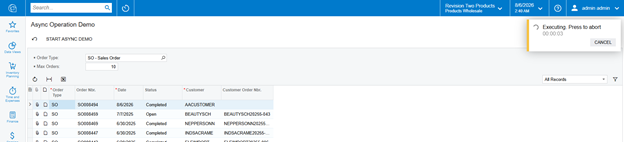
The background method is static and receives only the copied request values plus the cancellation token. It creates a new SOAsyncOperationDemo graph inside the background thread, then uses a parameterized Fluent BQL query to read the requested Sales Orders.
private static void ProcessOrdersInBackground(ProcessingRequest request, CancellationToken token)
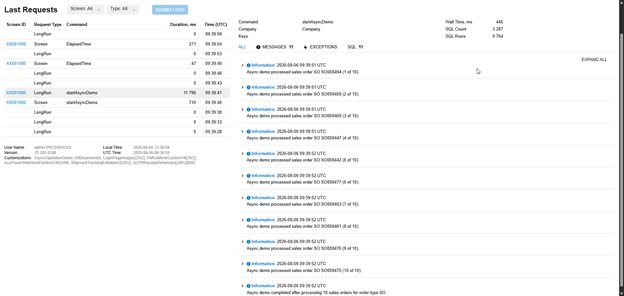
PXTrace.WriteInformation is enough for this example because we are demonstrating progress without mutating business data.
Best Practices Demonstrated
- Use IGraphLongOperationManager through LongOperationManager when starting a long operation from a graph.
- Return IEnumerable from the action handler so long-operation errors and completion status are visible in the UI.
- Do not use the current graph, caches, or DAC row references inside the background delegate. Copy simple values before starting the operation.
- Create a fresh graph inside the background operation with PXGraph.CreateInstance<TGraph>().
- Use Fluent BQL for new queries.
- Use the CancellationToken supplied by the framework and check it during loops.
- Add a Site Map entry or customization project screen entry so users can navigate to XX501000 from the UI.
Happy coding, and always keep improving your skills.
The complete source code and customization package used in this example are available here:
Comments are provided by Disqus, which sets its own cookies, including for advertising.